

Last week my cousin asked me a question I hear all the time: “I want to build a website, but where do I even start?” He expected a long list of tools and courses. Instead I opened a blank file on his laptop, typed eleven lines, and saved it. When he double-clicked that file, a real web page opened in his browser — with a big heading, a paragraph, and a link he could actually click. His face lit up. That is the magic of HTML: it is the first language of the web, and you can build something real with it in ten minutes flat. No setup, no account, no downloads — just a text file and a browser.
📅 Want a study plan for this topic?
Get a free 7-day learning plan in your calendar — one small lesson every day.
What Is HTML, Really?
HTML stands for HyperText Markup Language. Forget the fancy name for a second. It is simply a way of telling a browser what each piece of your page is: this is a heading, this is a paragraph, this is a list, this is a link. You write your words, wrap them in small labels called tags, and the browser does the rest — turning plain text into a page people can read. Every website you have ever visited, from Google to your favourite news site, is built on HTML underneath. The pretty colours and fancy animations come later; HTML is the skeleton that holds it all up.
The Main Idea
Most beginners get stuck right here: they think HTML is programming, and programming sounds hard. Honestly, it is not programming at all — it is closer to labelling boxes. A tag is just a label in angle brackets, like <h1> for a big heading and <p> for a paragraph. You open the label, write your text, and close it with a slash, like </h1>. When I first tried this, it clicked for me in about five minutes — I kept thinking, "Wait, that is all there is to it?" The secret is that HTML is forgiving. Even if you mess up a tag, the browser still shows your page; it just looks a bit off. That makes it the friendliest first step into coding that I know.
In Simple Words
Here is the whole idea, in four steps:
- An HTML tag labels a piece of content — a heading, a paragraph, a link.
- Most tags come in pairs: an opening tag and a closing tag with a slash.
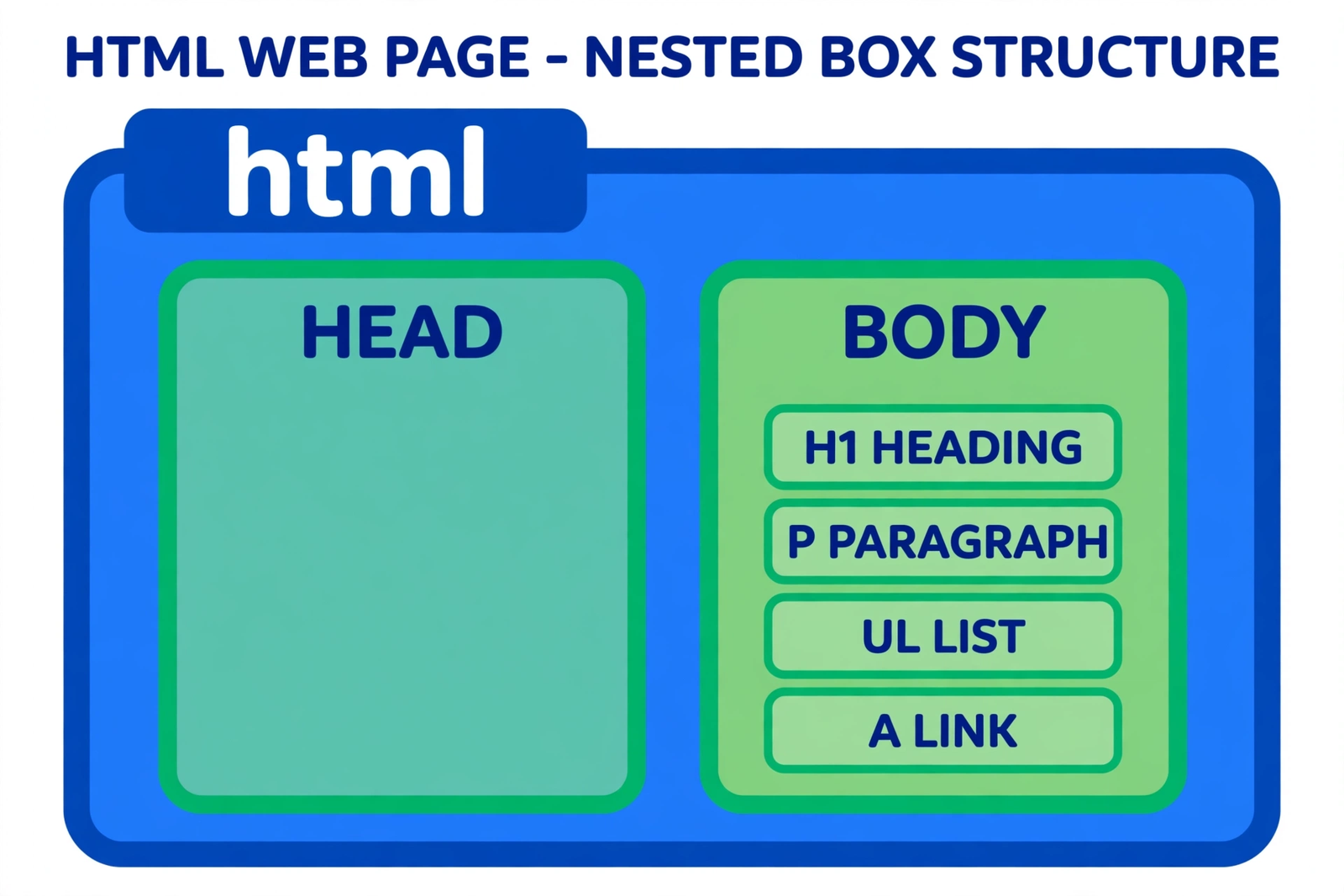
- Tags nest inside each other like boxes inside bigger boxes.
- Your browser reads the tags and draws the page for you — no software needed.
Let's Solve an Example: Sara Builds Her First Page
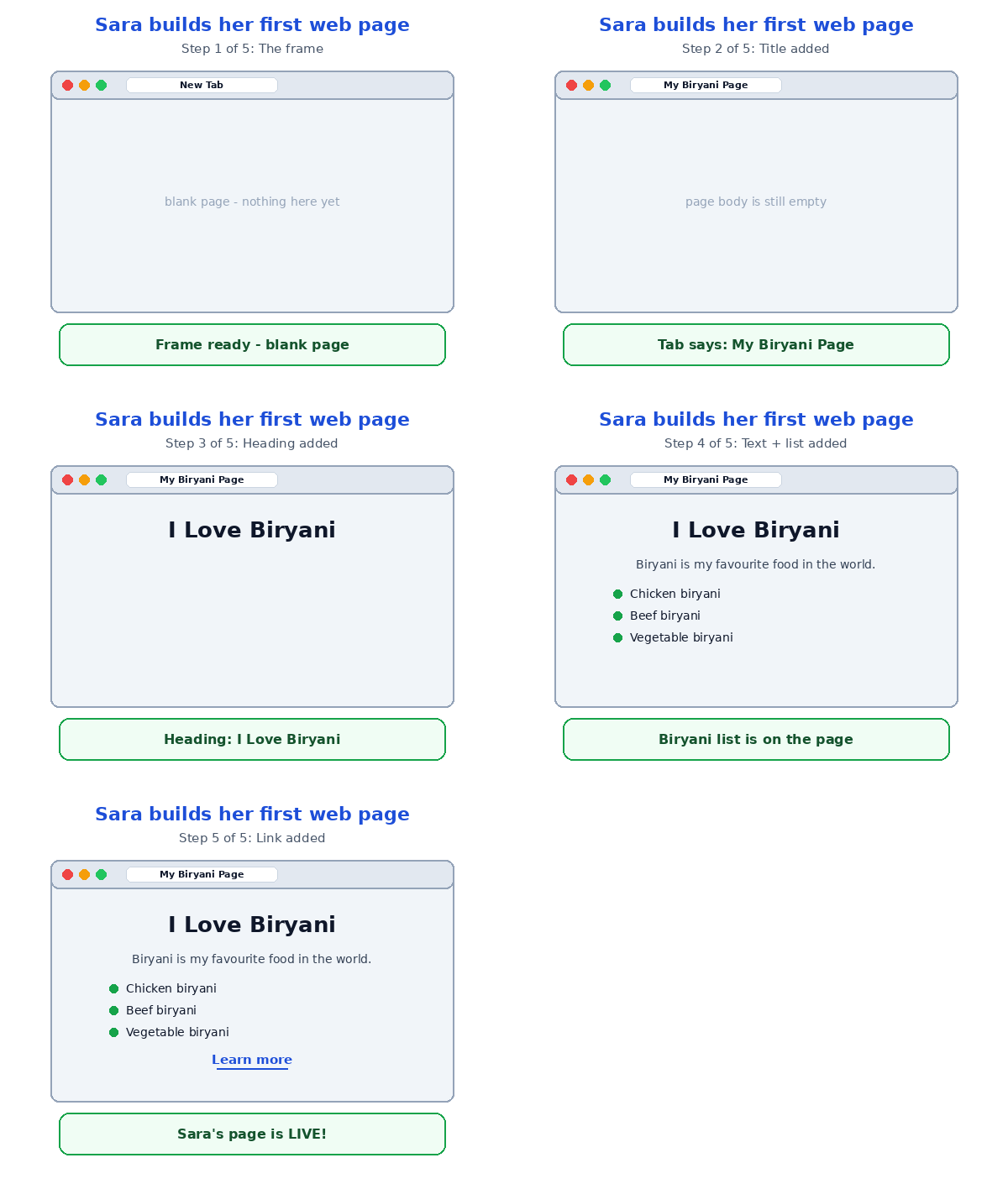
Meet Sara. She loves biryani, and she wants a tiny web page about it. Watch her page grow, one tag at a time:
| Step | What Sara adds | What the browser shows |
|---|---|---|
| 1 | DOCTYPE html and html | A blank page — the frame is ready |
| 2 | head with title "My Biryani Page" | The tab at the top says "My Biryani Page" |
| 3 | body with h1 "I Love Biryani" | A big bold heading appears on the page |
| 4 | p and a list ul with three li items | A paragraph, then three bullet points |
| 5 | A link: a href="https://thegeeksguru.com" — "Learn more" | Blue clickable text that jumps to another page |
Here is the full page she ended up with — all eleven lines of it:
<!DOCTYPE html>
<html>
<head><title>My Biryani Page</title></head>
<body>
  <h1>I Love Biryani</h1>
  <p>Biryani is my favourite food in the world.</p>
  <ul>
    <li>Chicken biryani</li>
    <li>Beef biryani</li>
    <li>Vegetable biryani</li>
  </ul>
  <a href="https://thegeeksguru.com">Learn more</a>
</body>
</html>
Notice step 4 carefully, because this is the part most people miss. The three li items sit inside the ul tag — that is nesting, and it is the one idea that makes all of HTML make sense. Tags are boxes inside boxes: the html box holds the head and body boxes, and the body box holds everything you see. In my opinion, once nesting clicks, the rest of HTML is just learning new labels. And here is my honest advice: type this page yourself, do not just copy it. Your fingers learn faster than your eyes — I still remember my first page because I typed every bracket by hand.
One practical tip from this example: save your file with a .html ending — for example, biryani.html — and double-click it. Your browser will open it straight away. Change one word, press save, refresh the browser, and the page updates. That little loop — edit, save, refresh — is how every web developer in the world works, even the ones building sites for millions of people.
HTML vs CSS vs JavaScript: Who Does What?
Beginners often mix these three up, so here is the simple version I wish someone had told me on day one. HTML is the structure — the walls, doors and rooms of a house. CSS is the paint and furniture — it decides colours, sizes and where things sit on the page. JavaScript is the electricity — it makes things move, respond and change when you click. You cannot paint a house that has not been built yet, which is why HTML always comes first. Learn it well and the other two become ten times easier, because they both work on the HTML you already wrote.
3 Mistakes Every Beginner Makes
I made all three of these, so you do not have to. First, forgetting the closing tag — an unclosed p makes the whole rest of the page behave like one giant paragraph. Second, nesting tags in the wrong order: always close the last tag you opened first, like stacking plates. Third, saving the file as .txt instead of .html — your browser will just show you the raw code, and you will think HTML is broken when it is only the file name. Honestly, if your page looks wrong, check these three things first. Nine times out of ten, the fix is one of them.
Test Your Understanding
Quiz: Sara writes <h1>I Love Biryani</h1>. What does the / in </h1> mean?
- It makes the heading appear in italics
- It closes the tag — it marks the end of the heading
- It turns the heading into a link
- It deletes the heading from the page
Answer: B. The slash marks the closing tag. Everything between <h1> and </h1> is the heading; the slash tells the browser "this label ends here." Without it, the browser would treat everything after as one endless heading.
Conclusion
HTML is not programming — it is labelling. Tags in pairs, boxes inside boxes, and a browser that does the drawing for you. Sara's eleven-line biryani page proves the point: you already know enough to build a real web page today. So do one thing right now: open a text editor, type those eleven lines, save as biryani.html, and double-click it. That little page on your screen is the first brick of every website you will ever build — and you laid it yourself.
📅 Want a study plan for this topic?
Get a free 7-day learning plan in your calendar — one small lesson every day.
Leave a Reply