

The first time I paid for something online, I stared at the little padlock next to the address bar for a good ten seconds before typing my card number. Was it safe? Who put it there? Honestly, I had no idea — I just hoped for the best. Years later I learned what that padlock actually does, and it is one of the cleverest tricks on the internet. It is called HTTPS, and once you see how it works, you will never look at that little icon the same way again.
📅 Want a study plan for this topic?
Get a free 7-day learning plan in your calendar — one small lesson every day.
What Is HTTPS, Really?
HTTPS stands for HyperText Transfer Protocol Secure — the same HTTP that moves web pages around, with a layer of encryption wrapped around it. The S is the whole story. When a website uses HTTPS, everything you send and receive — passwords, card numbers, messages — is scrambled into a secret code before it leaves your device, and only the real website can unscramble it. Anyone spying on the Wi-Fi in between sees nothing but nonsense. The padlock is simply the sign that this scrambling is switched on.
The Main Idea
Think of HTTP as shouting your card number across a crowded cafe, and HTTPS as whispering it in a language only you and the cashier understand. The words are the same; the privacy is completely different. That language is called TLS (Transport Layer Security), agreed in a quick handshake that takes less than a second, every time you open a page. That is the same encryption idea from my guide on what encryption is, working quietly every time you browse.
In Simple Words
Here is the whole idea, in four steps:
- Your browser asks the site for its certificate — its ID card.
- The site proves it really is who it claims to be.
- The two sides agree on a secret key for this visit only.
- Everything after that travels inside a locked tunnel.
Let's Follow One Click, Step by Step
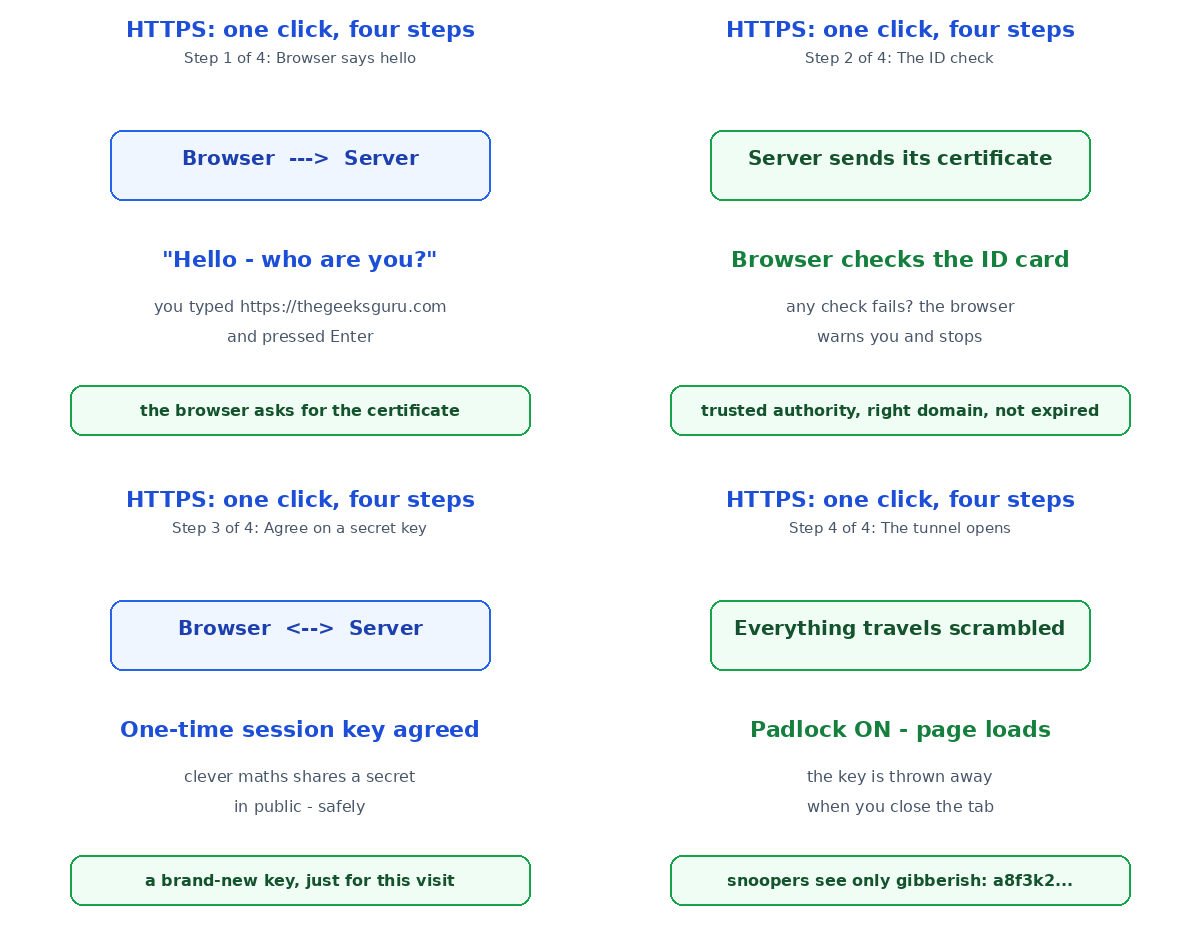
You type https://thegeeksguru.com and press Enter. Watch the handshake happen:
Step 1 — Hello. Your browser says hello to the server and asks for its certificate. Step 2 — ID check. The server sends its certificate, and your browser checks three things: it was issued by a trusted authority, it matches the domain name, and it has not expired. If any check fails, your browser warns you and stops. Step 3 — The secret key. Browser and server agree on a one-time session key, using clever maths that lets them share a secret in public without anyone else learning it. Step 4 — The tunnel opens. The page, your clicks, your login — everything now travels scrambled. A snooper on the same Wi-Fi sees only gibberish like "a8f3k2x9..." instead of your password.
My favourite detail: the session key is brand new for every visit, and it is thrown away when you close the tab. Even if someone recorded the scrambled traffic, they cannot open it later — the key is gone. That is why your bank login from last Tuesday cannot be replayed on Wednesday. The same journey starts with how the internet moves your click to a website — HTTPS is the locked van that carries it.

HTTP vs HTTPS: What's the Difference?
Same web, very different safety. Here is the honest comparison:
| HTTP | HTTPS | |
|---|---|---|
| Encryption | None — plain text | Yes — scrambled by TLS |
| Padlock | No padlock | Padlock in the address bar |
| What snoopers see | Everything you type | Meaningless gibberish |
| Safe for logins? | No | Yes |
| Google ranking | Lower | Small boost |
Google has pushed the whole web this way for years — Chrome now warns you outright when a page is "Not Secure". In my opinion, that warning is worth taking seriously on any page that asks for a password or a payment. A plain HTTP login form in 2026 is like leaving your front door open and hoping nobody walks in. And if you are curious how your browser even finds the site, that is the job of DNS, the internet's phone book.
What the Padlock Does NOT Mean
Here is the part most people get wrong, and it matters: the padlock proves the connection is private — it does NOT prove the website is honest. Scammers can put HTTPS on a fake bank page too; the padlock only means nobody can spy on your conversation with the scammer. So keep doing the other checks: the real domain name, the spelling, and the warning signs in my phishing scams guide. The padlock is a locked door, not a character reference — it keeps out eavesdroppers, but it cannot tell you if the person on the other side is a friend.
Test Your Understanding
Quiz: What does the padlock in your browser guarantee?
- The website is honest and safe
- Your connection to the site is encrypted
- The site has no viruses
- Your password is stored safely
Answer: B. The padlock means your connection is encrypted — nothing more. A fake site can have a padlock too, so always check the domain as well.
Conclusion
HTTPS is the quiet bodyguard of the web: a four-step handshake, a one-time secret key, and a locked tunnel for everything you type. Next time you shop or log in somewhere, glance at the address bar first — if there is no padlock, think twice before typing anything private. And when you do see that little padlock, you will now know the clever trick happening behind it: your words, whispered in a language only you and the real website understand.
📅 Want a study plan for this topic?
Get a free 7-day learning plan in your calendar — one small lesson every day.
Leave a Reply