

My first meeting with Linux was not planned. My old laptop had slowed to a crawl, Windows kept asking me to activate it, and a friend said four words: “Just try Linux, man.” I thought Linux was only for hackers in dark rooms, and I was sure I would break my laptop within an hour. I did not. Within one evening I had a fast, free system running on that same tired laptop. If price tags and pop-ups ever locked you out of your own computer, this guide is for you.
📅 Want a study plan for this topic?
Get a free 7-day learning plan in your calendar — one small lesson every day.
What Is Linux?
Linux is a free, open-source operating system — the same kind of software as Windows or macOS, built in the open by thousands of volunteers and companies. Strictly, Linux means the kernel, the core that talks to your hardware — but most people mean the whole system: kernel, apps, and the desktop on screen. When people say "I use Linux", they usually mean a flavour called a distribution, like Ubuntu, Fedora or Linux Mint. And here is the part that surprised me most: it already runs most of the internet's servers and most of the world's supercomputers — and your phone's Android is built on the Linux kernel too.
The Main Idea
Most beginners get stuck right here: they think Linux is one thing, like Windows is one thing. It is not. Think of Linux as a recipe that anyone can cook. The kernel is the base — the part that manages the processor, the memory and the disk. On top of that, a distribution adds the desktop, the apps and the settings, the way a restaurant adds its own flavour to the same recipe. Ubuntu is the friendly place for beginners. Fedora is the one that tries the newest dishes first. Linux Mint looks and feels a lot like Windows, so it is the easiest first step if you are switching. In my opinion, that choice is Linux's biggest strength: you pick the flavour that fits you.
In Simple Words
Here is the whole idea, in four steps:
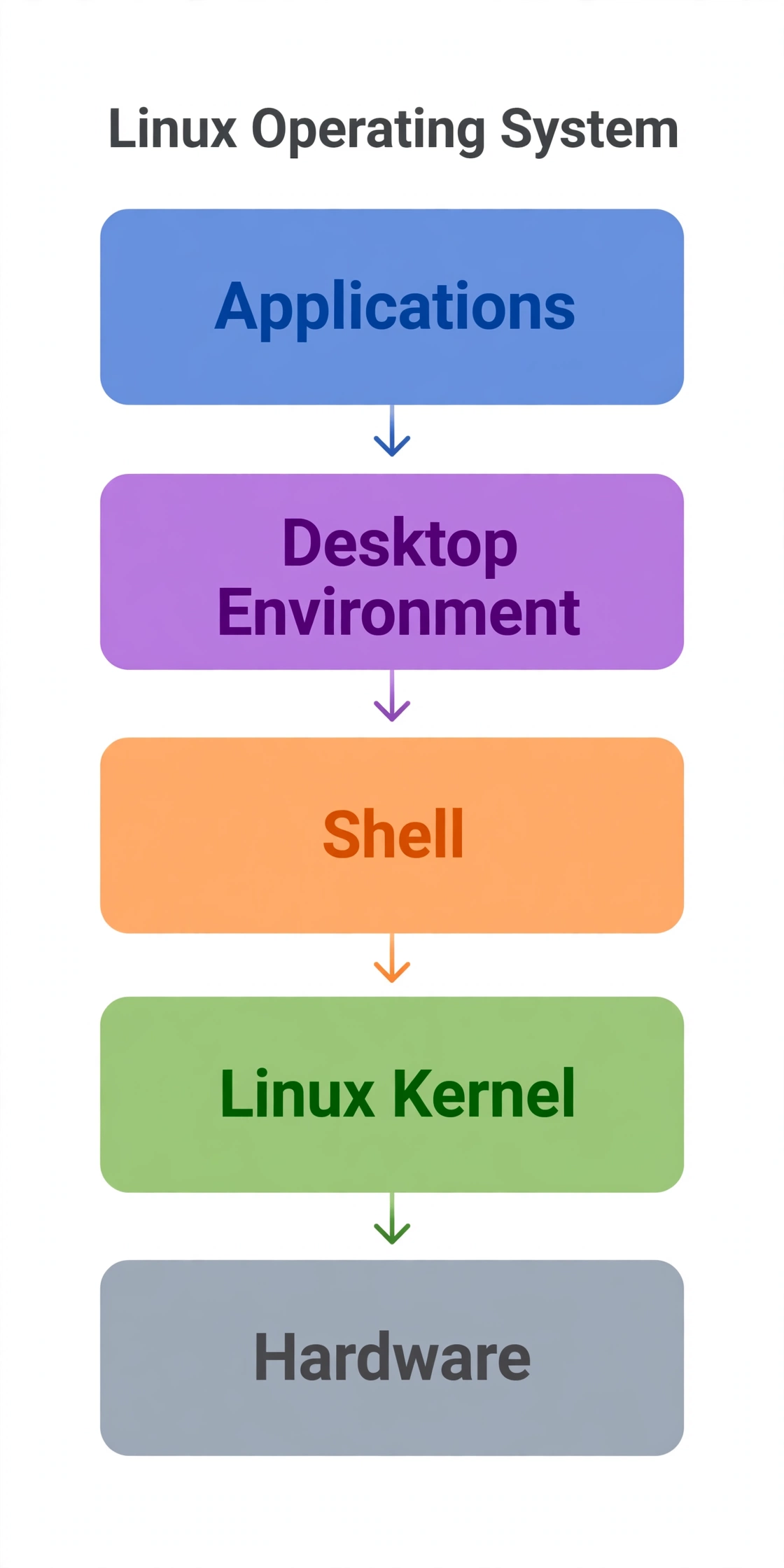
- The kernel talks to your hardware — processor, memory, disk and screen.
- The shell takes your typed commands and passes them to the kernel.
- The desktop gives you windows, icons and menus, so you rarely need the shell.
- Apps run on top — a browser, a music player, a text editor, all free.
Your First Evening with Linux: 5 Commands
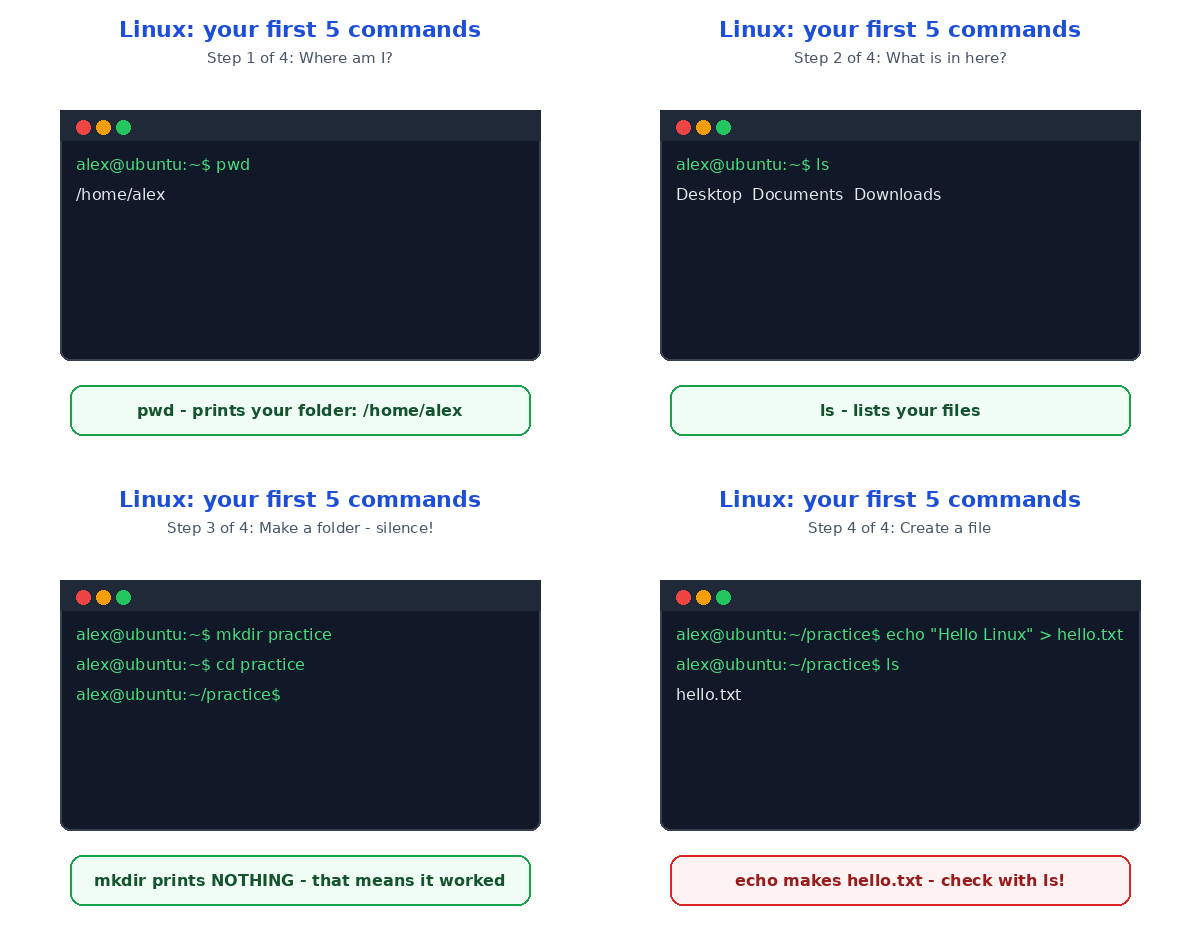
Let's make this real. Imagine you have just installed Ubuntu on an old laptop. You open the terminal — the little black window that looks scary but is really just a fast way to talk to your computer. Here are the first five commands I typed on my first evening, and what each one showed me:
| Step | Command | What it does | What you see |
|---|---|---|---|
| 1 | pwd | Shows where you are | /home/alex |
| 2 | ls | Lists your files | Desktop Documents Downloads |
| 3 | mkdir practice | Makes a new folder | Nothing printed — but it worked |
| 4 | cd practice | Moves into the folder | The prompt changes |
| 5 | echo "Hello Linux" > hello.txt | Creates a file with text | A file called hello.txt appears |
Watch step 3 carefully. The mkdir command prints nothing at all — and that silence confuses every beginner. In Linux, no news is good news: if a command works, it often says nothing, and only speaks up when something goes wrong. I remember typing mkdir, seeing a blank line, and thinking I had broken it. Then ls showed me my new folder, and I finally got it. That is the moment Linux clicked for me: the terminal is not testing you, it is just quiet. If you enjoy this way of talking to your computer, the command line is the skill to learn next — the same idea, with ten commands to try.
You can do all of this with clicks too — the file manager does the same job — but five commands teach you more about how a computer thinks than a week of clicking. And if you want the bigger picture first, read what an operating system actually does before you go deeper. It explains the kernel, the shell and the desktop in the same plain language, and it will make everything above feel obvious.
Linux vs Windows: The Honest Comparison
So should you switch? Here is my honest take, in one table:
| Linux | Windows | |
|---|---|---|
| Cost | Free | Paid licence |
| Viruses | Rare, and strict permissions help | The most common target |
| Old hardware | Runs well on it | Often struggles |
| Software | Thousands of free apps | Huge commercial choice |
| Learning curve | A little patience at first | Familiar from day one |
I recommend Linux most for one group: anyone with an old laptop, a student budget, or a love of learning how computers really work. If you play the newest games on day one, Windows is still the safer pick — honestly, gaming is the one place where Linux still makes you work for it. But for writing, coding and browsing, my old laptop on Linux feels faster than it ever did new. And because it is open source software, nobody can lock you out with a licence key again.
Two Traps Every Beginner Hits
First trap: installing random commands you find online. The terminal is powerful — one careless command can delete your files — so never paste a command you do not understand, especially one starting with sudo rm. Read it first, or ask someone who knows. Second trap: distro-hopping. Beginners install Ubuntu on Monday, Fedora on Wednesday, and Arch on Friday, then complain Linux is hard. Pick one beginner-friendly flavour — Ubuntu or Linux Mint, in my opinion — and live with it for a month. The system is not the hard part; the switching is.
Test Your Understanding
Quiz: You type pwd in the terminal and it prints /home/alex. What does that mean?
- Your password is "alex"
- You are currently in the folder /home/alex
- Your computer has no folders
- Linux has crashed
Answer: B. The pwd command prints your working directory — the folder you are standing in right now. If you picked A, don't worry: pwd has nothing to do with passwords, even though the letters look alike.
Conclusion
Linux is a free operating system built in the open — a kernel, a shell, a desktop and a mountain of free apps, in whatever flavour fits you. Try it without installing anything: download Ubuntu, put it on a USB stick, and boot from it. Your files stay safe, nothing changes, and you get a full evening to play with those five commands. That is exactly how I started, on a laptop I had almost thrown away — and it is still running today.
📅 Want a study plan for this topic?
Get a free 7-day learning plan in your calendar — one small lesson every day.
Leave a Reply