

My first real program was a mess. I was tracking twenty students, and I had twenty names in one list, twenty marks in another list, and twenty attendance numbers in a third. Change one student’s name and you had to fix three lists — and I got it wrong constantly. Then a senior showed me a different way: put everything about one student inside one thing, a student object, and the mess vanished overnight. That idea is called OOP — Object-Oriented Programming — and honestly, it is the single trick that turned coding from a headache into something I actually enjoy.
📅 Want a study plan for this topic?
Get a free 7-day learning plan in your calendar — one small lesson every day.
What Is OOP?
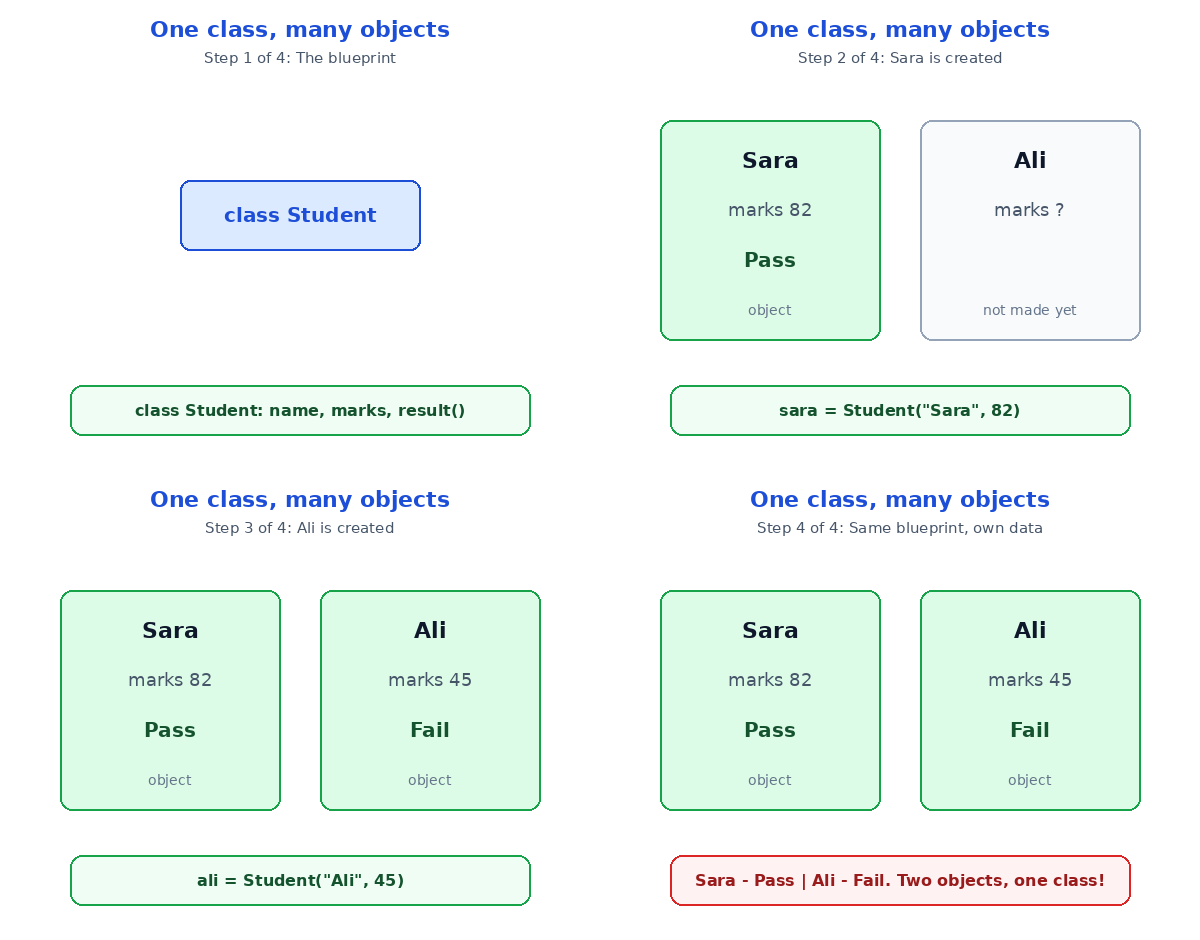
OOP is a way of writing code where you build objects — bundles of data and the actions that work on that data — instead of long lists of loose variables and functions. An object is made from a class, which is the blueprint, and the object is the real thing built from it. Think of a class as a house blueprint: one blueprint, many houses. In Python, a class called Student can create twenty different student objects, each with its own name and marks.
The Main Idea
Most beginners get stuck right here: they hear "class" and "object" and assume it is some advanced theory for experts only. It is not. You already think in objects every day — your phone is an object with data (battery level, storage) and actions (make a call, take a photo). OOP just lets your code think the same way. When I first tried this, the penny dropped when I realised my twenty-student mess was really twenty objects pretending to be sixty loose variables.
In Simple Words
Here is the whole idea, in four steps:
- You write a class — a blueprint that describes what a thing has and does.
- You create objects from the class — real copies, each with its own data.
- Each object keeps its own attributes — name, marks, attendance.
- You call methods on an object — actions like "show my result" or "mark me present".
Let's Build a Student Object, Step by Step
Here is a tiny Python class, and what happens when we use it. Follow each step — the state on the right is what Python remembers:
class Student:
    def __init__(self, name, marks):
        self.name = name
        self.marks = marks

    def result(self):
        if self.marks >= 50:
            return "Pass"
        return "Fail"

sara = Student("Sara", 82)
print(sara.name, "-", sara.result())
| Step | What happens | What Python remembers |
|---|---|---|
| 1 | The class Student is defined | Blueprint ready: name, marks, result() |
| 2 | sara = Student("Sara", 82) | One object: name "Sara", marks 82 |
| 3 | sara.result() is called | 82 is 50 or more, so it returns "Pass" |
| 4 | print shows the answer | Output: Sara - Pass |
Now here is the part that changed my code forever: making a second student costs exactly one line — ali = Student("Ali", 45) — and Ali gets his own name, his own marks, and his own result, without touching Sara's data. With plain lists, that was three lists and a prayer. I recommend starting with exactly this pattern: one small class, two objects, one method. You will feel the difference in ten minutes. If you are new to Python itself, start with Python for complete beginners first — and if you want to sharpen the functions inside your methods, read Python functions next.

The Four Pillars of OOP
Every OOP course mentions four big words. Here they are, in plain English, because the fancy definitions scare more beginners than they help:
| Pillar | Plain meaning | Real-life example |
|---|---|---|
| Encapsulation | Keep data and its actions together in one object | A TV remote: buttons and battery inside one case |
| Inheritance | A new class reuses an old class | A sports car inherits from a car, then adds speed |
| Polymorphism | Same action, different behaviour per object | "Speak" makes a dog bark and a cat meow |
| Abstraction | Hide the messy details, show only what matters | You press a button; you never see the wiring |
Do not try to memorise these today. Just notice them in code you read — you will spot encapsulation every time an object carries its own data around. The other three will click later, one at a time, and that is fine. Honestly, most working programmers use encapsulation daily and only think about the other pillars when they need them.
Two Traps Every Beginner Hits
First trap: making a class for everything. If your program just adds two numbers, a plain function is better — a class would be a hammer looking for a nail. Use objects when you have a real "thing" with data and actions, like a student, a book, or a bank account. Second trap: putting everything in one giant class. A Student class should not also handle printing report cards and sending emails — split jobs into small classes that do one thing well. If a class starts feeling like a junk drawer, it is time to split it. A Python dictionary is a good middle step if full classes still feel heavy: it bundles data too, just without the actions.
Test Your Understanding
Quiz: You write class Dog with a method bark(). You create rex = Dog() and bella = Dog(). What is rex?
- A class
- An object (an instance) of the Dog class
- A function
- A Python keyword
Answer: B. Dog is the class (the blueprint); rex is an object built from it. rex and bella are two separate objects, each with their own data, even though they share the same blueprint.
Conclusion
OOP turns your code into a collection of small, sensible things — objects built from class blueprints, each carrying its own data and actions. Start tiny: one Student class, two objects, one method. That is the whole idea, and it scales all the way up to apps with millions of users. Open your editor today, type the Student example above, and change the marks — watch Sara pass and Ali fail, all from the same four lines of blueprint.
📅 Want a study plan for this topic?
Get a free 7-day learning plan in your calendar — one small lesson every day.
Leave a Reply