

Introduction
Let’s understand Python functions step by step, with an example you can actually run. When I wrote my first “real” Python program — a little marks calculator for my cousin — I copy-pasted the same five lines of code in three different places. It worked! Then the teacher changed the grading formula, and I had to hunt down all three copies and fix each one. That’s the day functions finally clicked for me — and they’ll click for you too, in the next five minutes.
📅 Want a study plan for this topic?
Get a free 7-day learning plan in your calendar — one small lesson every day.
What Is a Python Function?
A function is a named block of code that does one specific job. You define it once with the def keyword, and then you can call it by name as many times as you want. Think of it like a kitchen appliance: you drop ingredients in, it does its thing, and it hands you back a finished result.
The main idea
Programmers have a golden rule: DRY — Don't Repeat Yourself. Every time you catch yourself copying code, that's a function begging to be born. One definition, endless reuse — and when the logic changes, you fix it in exactly one place. If you're brand new to Python, start with my Python for complete beginners guide first, then come back here.
In simple words
- Define the function with
defand give it a name. - List its parameters — the labeled "jars" that will hold inputs.
- Call it by name, handing over real values called arguments.
- The function runs its code and sends an answer back with return.
Let's Solve an Example: The Tip Calculator
Here's a tiny program that calculates a restaurant tip. Read it slowly — then watch what happens at each step:
def calculate_tip(bill, percent):
    tip = bill * percent / 100
    return tip

total = calculate_tip(2000, 10)
print("Tip:", total)   # Tip: 200.0
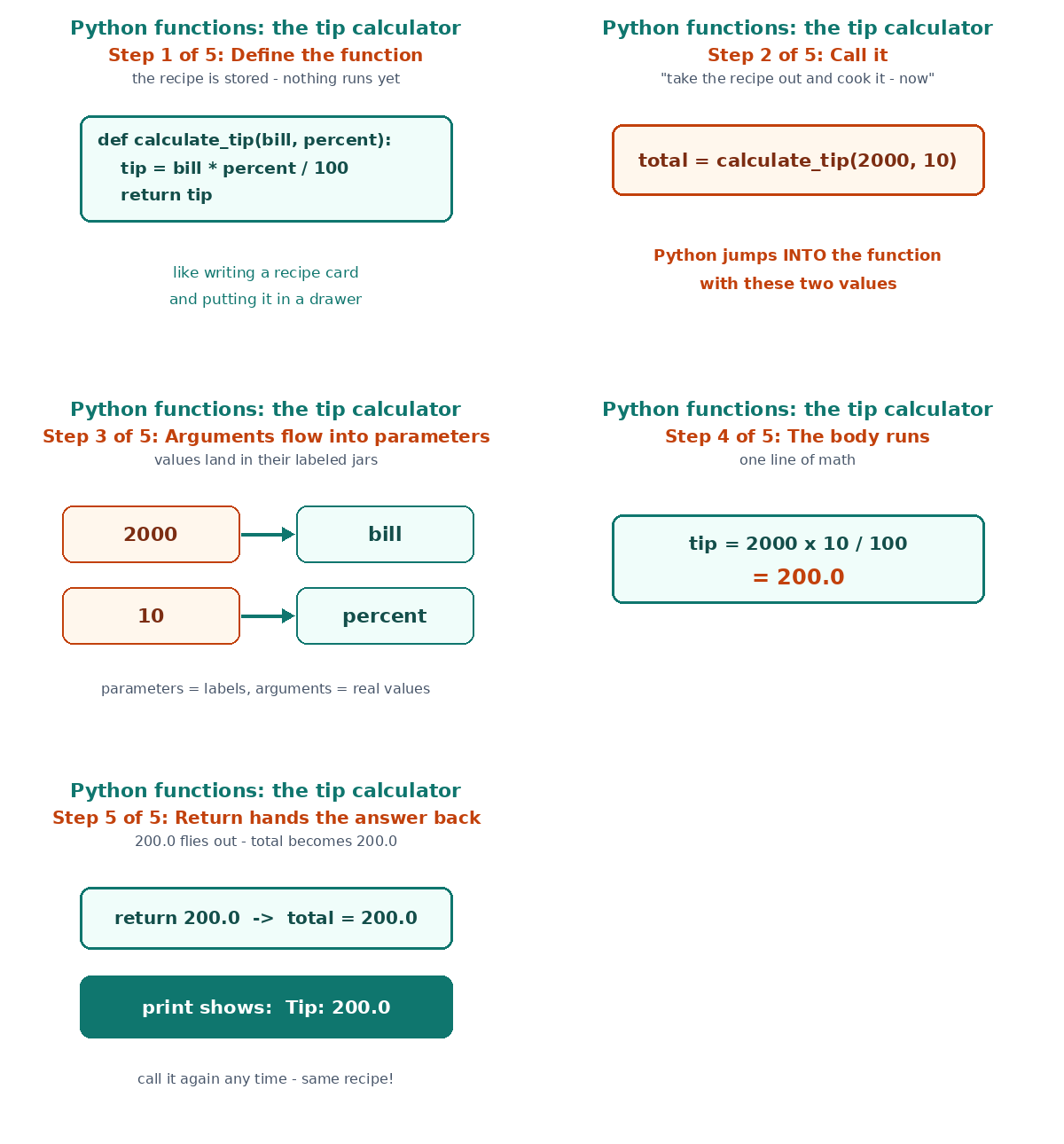
Step 1 — Define (nothing runs yet): Python reads the def line and stores the recipe under the name calculate_tip. Most beginners get stuck right here: defining a function does not run it. It's like writing a recipe card and putting it in a drawer.
Step 2 — Call: calculate_tip(2000, 10) tells Python: "Take that recipe out of the drawer and cook it — now."
Step 3 — Arguments flow into parameters: The value 2000 lands in the jar labeled bill, and 10 lands in percent. Parameters are the labels; arguments are the actual ingredients.
Step 4 — The body runs: tip = 2000 * 10 / 100 → 200.0.
Step 5 — Return hands the answer back: 200.0 flies out of the function and lands in total. The print shows Tip: 200.0. Done — and you can now call calculate_tip on any bill, any percent, forever.
Here's the whole flow as a picture, plus a short animation walking through it:

Parameters vs Arguments: Stop Mixing Them Up
I mixed these two up for weeks, so here's the trick that finally stuck: parameters are the placeholders in the definition; arguments are the real values in the call. One more way to remember it — parameters are like the labeled jars on a shelf, arguments are what you actually pour into them.
| Parameter | Argument | |
|---|---|---|
| Where | Inside the def line | Inside the call |
| Example | bill, percent | 2000, 10 |
| Role | Placeholder name | Real value |
Functions pair beautifully with the data structures you already know — a function can take a whole dictionary of student marks and return the class average in three lines.
Why Bother? My Honest Take
In my opinion, functions are the first habit that separates "someone who tried Python" from "a programmer." Three reasons I never skip them now: you fix bugs in one place instead of five, you can test each piece on its own, and your code reads like a story — calculate_tip, split_bill, print_receipt. Honestly, the first time you reuse a function in a completely different project, you'll feel like a genius. Pair them with loops and you can process a hundred bills as easily as one.
Test Your Understanding
Question: In the call calculate_tip(2000, 10), what is 2000?
- A parameter
- An argument
- A return value
- A function name
Answer: B — it's the real value handed over at the call site. The parameter is the placeholder bill waiting inside the definition.
📅 Want a study plan for this topic?
Get a free 7-day learning plan in your calendar — one small lesson every day.
Related Articles
- Python for Complete Beginners: Write Your First Program Today
- Python Lists and Loops Explained: Store Many Things, Repeat Less Work
- Unlock Python Dictionaries: Keys to Better Code
Conclusion
A function is just a recipe you write once and cook a hundred times: define it with def, call it by name, pass arguments into parameters, and catch the answer with return. Your homework — the fun kind: take any program where you repeated yourself and turn the repeated part into a function. Future-you, fixing a bug at midnight in exactly one place, says thanks.
[…] stop you with an error. If you want the full picture of how functions use these same decisions, my Python functions guide shows them in action inside reusable […]