

The first time I flipped over my home router, I found a sticker covered in numbers: 192.168.1.1, a username, a password. I typed that strange number into my browser, and suddenly I was inside the router’s settings page — like finding a secret door in my own house. That number was an IP address, and every device you own has one. Once you understand it, the internet stops looking like magic and starts looking like a postal system with very good manners.
📅 Want a study plan for this topic?
Get a free 7-day learning plan in your calendar — one small lesson every day.
What Is an IP Address?
An IP address is a unique number that identifies a device on a network — your phone, your laptop, a website's server. IP stands for Internet Protocol, and the address works exactly like a home address on a letter: without it, nothing you send would ever arrive, and nothing sent to you would find you. When you open a website, your device and the website's server swap IP addresses first, then the conversation begins.
The Main Idea
Most beginners get stuck right here: they picture the internet as one giant cloud, and the idea of addresses feels unnecessary. But here is the honest truth — the internet is just millions of computers shouting at each other, and an IP address is the only thing that tells them who is shouting. When I first tried to explain this to my younger cousin, the postal analogy clicked instantly: a street address does not tell you anything about the person inside the house, it just tells the postman where to knock. An IP address does the same job for data.
In Simple Words
Here is the whole idea, in four steps:
- Your device gets an IP address when it joins a network — like getting a seat number.
- You ask for a website — your request carries your address and the site's address.
- Routers along the way read the address and forward your request, hop by hop.
- The website replies to your address — and the page appears on your screen.
Let's Follow One Message Across the Internet
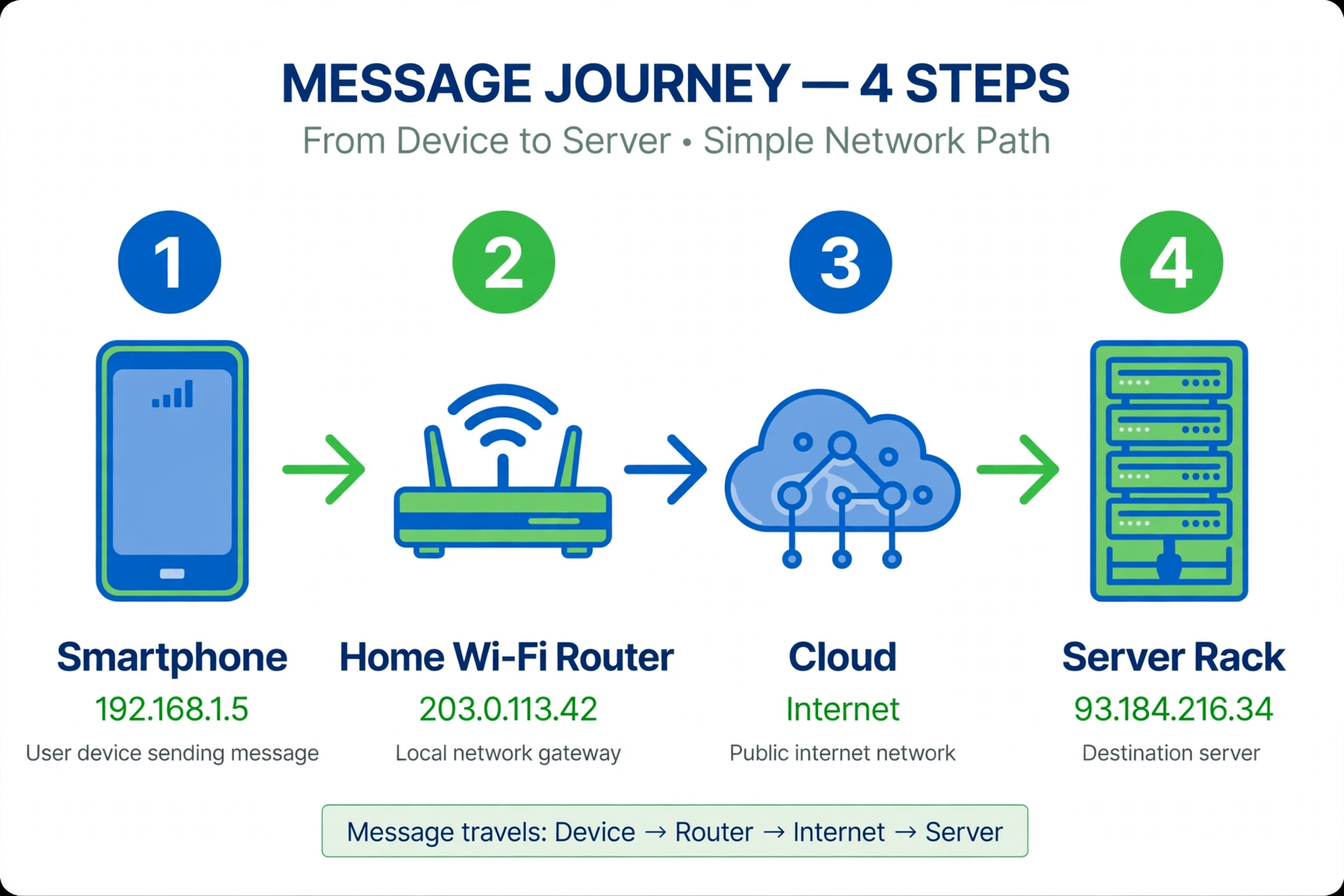
Meet Sara. She is sitting at home in Layyah, and she taps a link to a news website. Watch her request travel — every hop has an address:
| Hop | Where the message is | IP address |
|---|---|---|
| 1 | Sara's phone on home Wi-Fi | 192.168.1.5 (private) |
| 2 | Her home router, sending it out | 203.0.113.42 (public) |
| 3 | Her internet provider's network | Passing it along, hop by hop |
| 4 | The news website's server | 93.184.216.34 (public) |
Notice hop 1 and hop 4 carefully, because this is the part most people miss. Sara's phone has a private IP address — 192.168.1.5 — which only works inside her home. Her router translates it into a public IP address — 203.0.113.42 — before the message leaves the house. It is like a company receptionist: visitors only ever see the company's main number, never your desk extension. The website's server has its own public address, 93.184.216.34, and it replies to Sara's public address. The whole trip takes a fraction of a second, and it happens every single time you tap a link. Honestly, I still find that a little bit wonderful — four strangers' computers cooperating perfectly, billions of times a day.

One practical tip from this example: your public IP address can reveal your city and your internet provider. That is normal — it is how the reply finds you — but it is also why a VPN exists: it masks your real address behind the VPN server's address. And when you type a website name instead of numbers, remember how DNS finds websites for you — DNS is the phonebook that turns names into IP addresses.
IPv4 vs IPv6: Why We Ran Out of Numbers
The original address system, IPv4, uses four groups of numbers like 192.168.1.5 — and it only has about 4.3 billion possible addresses. That sounded like plenty in 1981, when almost nobody owned a computer. Today your watch, your TV and your fridge all want one. We ran out, so the internet built a bigger system: IPv6, with addresses like 2001:0db8:85a3:0000:0000:8a2e:0370:7334, and enough room for every grain of sand on Earth to have its own address.
| IPv4 | IPv6 | |
|---|---|---|
| Looks like | 192.168.1.5 | 2001:0db8:85a3::8a2e:0370:7334 |
| Length | 32 bits | 128 bits |
| How many | About 4.3 billion | About 340 undecillion |
| Status today | Still the most common | Slowly taking over |
In my opinion, beginners should not worry about memorising IPv6 — just know it exists, know it is longer, and know that your devices quietly use both already. Your phone probably has one of each right now, and you never had to do a thing.
Two Traps Every Beginner Hits
First trap: sharing your IP address in a screenshot. Your public address is not a password — it cannot log anyone into your accounts — but posting it publicly is still a bad idea, because it reveals your provider and rough location. Blur it out of screenshots, just like you would your phone number. Second trap: thinking your IP address never changes. Most home connections get a dynamic IP address that changes every few days, while servers pay for a static IP address that stays fixed so everyone can always find them. If your home IP changes and a website suddenly logs you out, that is why — and it is perfectly normal. For the full journey of a click, read how the internet actually works.
Test Your Understanding
Quiz: Sara's phone has the address 192.168.1.5 at home, but the website she visits sees 203.0.113.42. Why?
- Her phone has two different addresses for fun
- Her router translates the private address into a public one
- The website made up a fake address for her
- 192.168.1.5 is the website's address
Answer: B. 192.168.1.5 is a private address that only works inside Sara's home network. Her router swaps it for the public address 203.0.113.42 before the request leaves the house, so the website only ever sees the public one.
Conclusion
An IP address is your device's home address on the internet — private inside your house, public outside it, and the reason every reply you receive finds its way back to you. IPv4 is running out of room, IPv6 is the long-term fix, and your router quietly handles the translation between the two worlds. Do one thing today: open your Wi-Fi settings and find your own IP address. It is the first number in the internet's phonebook — and now you know it belongs to you.
📅 Want a study plan for this topic?
Get a free 7-day learning plan in your calendar — one small lesson every day.
Leave a Reply