

The first time a website greeted me by name, I felt oddly watched. I had only visited that shop once, days earlier, and now it remembered my cart, my size, and the shoes I had almost bought. Nobody had asked me for any of that — at least, not that I remembered. The truth was simpler: the site had left a tiny note in my browser, and my browser handed it back. That tiny note is a browser cookie — and once you understand it, half the “magic” of the internet suddenly makes sense.
📅 Want a study plan for this topic?
Get a free 7-day learning plan in your calendar — one small lesson every day.
What Are Browser Cookies?
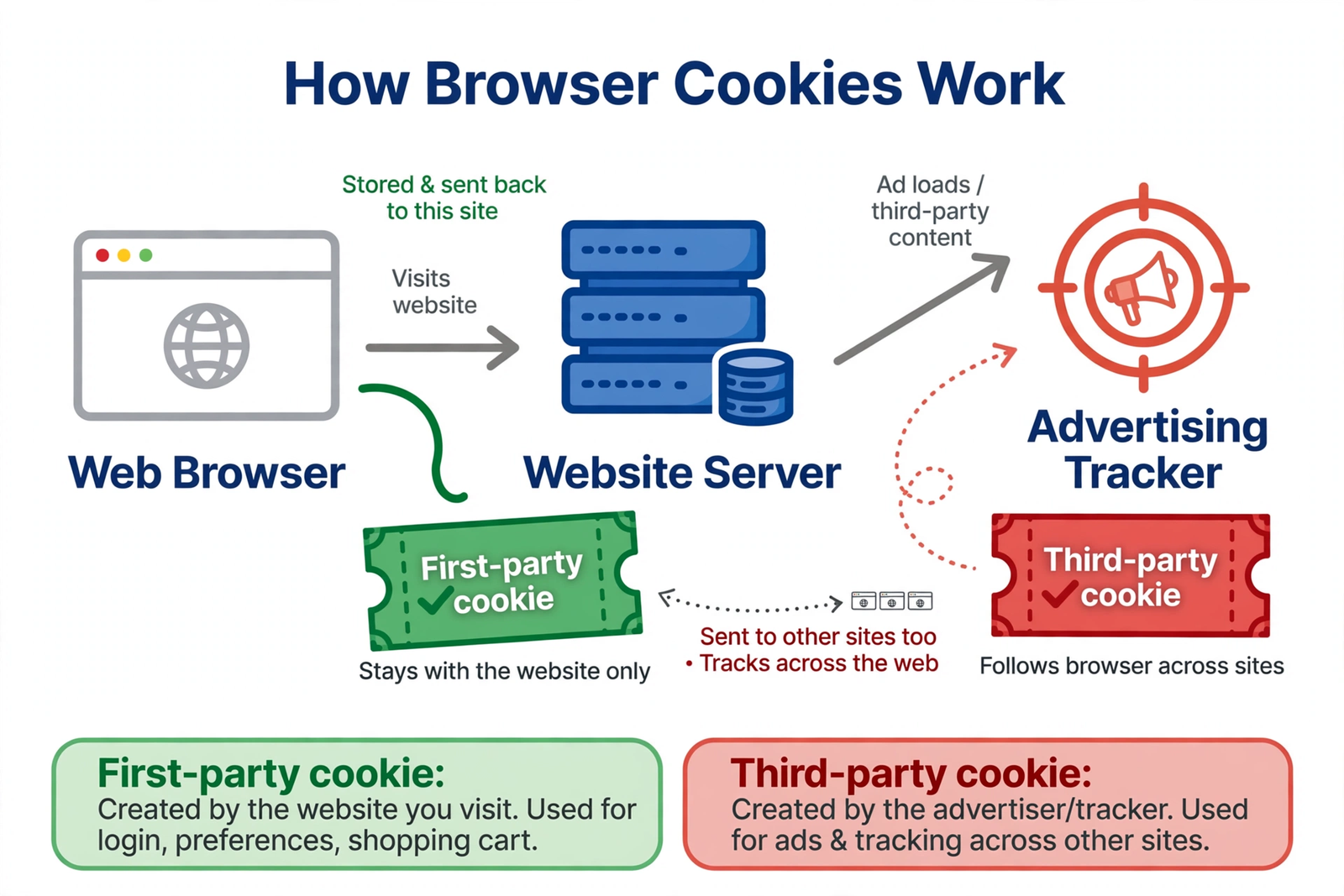
A browser cookie is a small text file that a website asks your browser to store on your computer. It holds a little information — a name, a value, and an expiry date — and nothing more. Cookies were invented in 1994 by Lou Montulli, an engineer at Netscape, because early websites had a problem: they forgot you the moment you clicked to the next page. A shopping site could not remember your cart, and a news site could not remember your login. The cookie fixed that. Visit a site and it gives your browser a cookie; come back, and your browser shows it — "Ah, it's you again."
The Main Idea
Most beginners get stuck right here: they hear "cookie" and picture a virus, or a hacker watching their screen. A cookie is neither. Think of it as a cloakroom ticket. You hand your coat to the cloakroom, they give you a numbered ticket, and when you return with the ticket, they find your coat. The ticket is not your coat — just a small piece of paper with a number. A cookie works the same way: the website keeps the real data on its own servers, and the cookie in your browser is just the ticket number that links the two. The danger is not the ticket, it is who else gets to read it.
In Simple Words
Here is the whole idea, in four steps:
- You visit a website for the first time — it has never seen you before.
- The site asks your browser to save a small cookie, like a name tag with a number.
- You come back later — your browser shows the cookie automatically.
- The site recognises you — your login, your cart, your language, all back in place.
Let's Follow One Cookie Through a Day
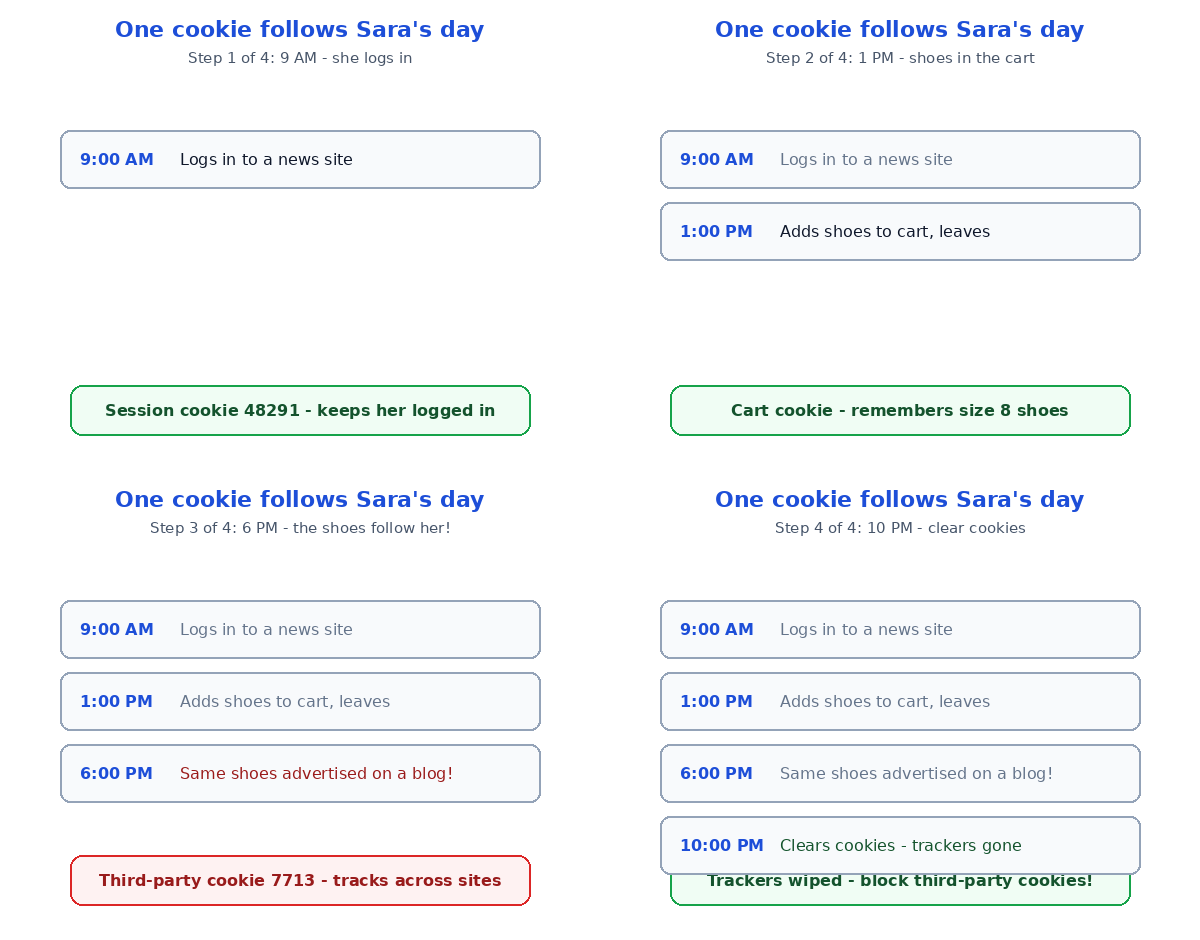
Meet Sara. She does three ordinary things in a day — and one cookie quietly follows her through all of them:
| Time | What Sara does | What the cookie stores |
|---|---|---|
| 9:00 AM | Logs in to a news site | Session ID 48291 — "she is logged in" |
| 1:00 PM | Adds shoes to a cart, leaves without buying | Cart items: 1 pair of shoes, size 8 |
| 6:00 PM | Reads a cooking blog — and sees the same shoes advertised | Ad tracker ID 7713 — "she likes these shoes" |
| 10:00 PM | Closes the browser | Session cookie deleted; the tracker cookie stays |
Watch the 6:00 PM row carefully, because that is the moment most people feel watched. The cooking blog did not know about Sara's shoes — but the ad on that blog came from an advertising company that had already placed its own cookie on Sara's browser when she visited the shoe shop. That is a third-party cookie: a cookie set not by the site you are looking at, but by someone else hiding inside it. The first-party cookie at 9:00 AM was helpful — it kept Sara logged in. The third-party cookie at 6:00 PM is the one that follows her around the web. Honestly, I find the first kind useful and the second kind creepy — and telling them apart is the whole trick.
The good news is that you are not helpless here. Your browser has a cookie switchboard: in Chrome, open Settings, then Privacy and security, then Third-party cookies, and you can block third-party cookies entirely — most sites still work fine. Clear your cookies once a month too: it logs you out of most sites but wipes the trackers clean. A VPN helps in a different way: it hides your location, while cookie settings hide your trail. Use both — they solve different halves of the same problem.
First-Party vs Third-Party Cookies
Here is the difference in one table, because this is the question that matters most:
| First-party cookies | Third-party cookies | |
|---|---|---|
| Set by | The site you are visiting | An advertiser or tracker inside it |
| Job | Remember your login, cart and settings | Follow you across many sites |
| Risk | Low — mostly helpful | Higher — builds a profile of your habits |
| What to do | Keep them | Block them in your browser settings |
One more thing beginners mix up: cookies are not viruses. A cookie is plain text — it cannot install software or read your files, and it cannot steal your passwords by itself. The real danger comes when a cookie is combined with something else, like a fake login page. That is why a password manager matters: even if a tracker learns which sites you visit, it never learns your password. And if a site ever asks you to log in from a strange link, read how phishing scams work first — that is where the real theft happens.
Two Traps Every Beginner Hits
First trap: clicking "Accept all cookies" without reading. That big friendly button lets every tracker in, not just the helpful ones. Take ten seconds and click "Reject all" or "Only necessary" instead — the site still works, and your trail stays much shorter. Second trap: thinking that clearing cookies makes you invisible. It does not. Clearing cookies logs you out of your sites, but advertisers can still recognise your device by other means. Cookies are one lock on the door, not the whole door — pair them with a VPN and strong passwords for real privacy.
Test Your Understanding
Quiz: Sara shops for shoes on Site A, then sees the same shoes advertised on Site B. Which cookie is responsible?
- A first-party cookie from Site A
- A third-party cookie from an advertiser
- No cookie at all — the sites guessed
- A computer virus
Answer: B. Only a third-party cookie can follow Sara from one site to another, because it belongs to the advertiser, not to either site. If you picked D, remember: cookies are plain text, and plain text cannot be a virus.
Conclusion
Browser cookies are tiny text notes that help websites remember you — your login, your cart, your settings. First-party cookies are mostly your friends, third-party cookies are the ones that follow you around, and you can block the followers in two minutes from your browser settings. Do it today: block third-party cookies, clear the old ones, and pick "Only necessary" next time a banner appears. The internet will still remember the things that help you — and forget the trail you never agreed to leave.
📅 Want a study plan for this topic?
Get a free 7-day learning plan in your calendar — one small lesson every day.
Leave a Reply